









OSV16

Broader Expression, Reliable Peace of Mind
This update is all about expanding your creative possibilities while ensuring dependable security.
With downloadable ”themes”, you can make your smartphone screen even more vibrant and expressive.
The camera now features ”PHOTO STYLE filters”, allowing you to capture photos that reflect your feelings just as you imagined.
Additionally, we’re introducing a "Security Alert" feature for peace of mind in case of emergencies.
Of course, we’ve also improved UI usability, performance, and other essential aspects for an even smoother experience.
Here’s a look at what’s new with AQUOS!
OS Update Highlights
- Express Yourself with Personalized Choices
- Smart Features That Capture Your Intentions
- Peace of Mind for You and Your Smartphone
*Note: Some features may not be available on all models. Please check individual notes for details.
Express Yourself with Personalized Choices
More Themes for Your Style – Wallpapers and style
Downloadable Themes
AQUOS exclusive
You can now download themes directly from "Wallpaper and style".
Find the perfect theme that suits you.
Japan
Theme: Japan
A theme inspired by the beauty of Japanese mountains.

How to Download Themes

Preset Themes and Clock Additions
AQUOS exclusive
New "Themes" and "Lock Screen Clock" options will be added to Wallpaper & style
Choose the one that best fits your style.


Note: AQUOS R10 AQUOS wish5, and AQUOS wish5s already support this feature.
Turn Your Photos into Art – Camera
PHOTO STYLE Filters
AQUOS exclusive
In addition to the three basic filters, eight photographer-supervised filters have been added.
Each filter is easy to understand and helps you create photos that reflect your unique sensibility.
For example, using the “Magic Hour” filter allows you to capture stunning sunset scenes.
Original
PHOTO STYLE Filters ON [Magic Hour]


* AQUOS R9 pro and AQUOS sense9, the "Image quality switch" in Android 15 camera settings will be replaced by PHOTO STYLE filters.
"Natural” will be renamed to “Original” and “Dynamic” renamed to "Vivid"
* The default setting of the PHOTO STYLE filter is “Original”
If you prefer the same image quality of “Dynamic” setting of the “Image Quality Switch” in Android 15, please use “Vivid” in the PHOTO STYLE filter.
* AQUOS R10, AQUOS wish5, and AQUOS R9 pro, “Monochrome” will be renamed to “Grayscale”.
* AQUOS wish5s supports photos only. For videos, only the three basic filters are supported.
* AQUOS wish5 does not support the eight photographer-supervised filters.
* AQUOS wish4 is not supported.
1) Watermark Outside the Photo
2) AQUOS exclusive
3) You can now place watermarks outside the photo frame.
4) Customize it to suit your creation.

*AQUOS R10 and wish5s already support this feature.
*AQUOS sense8, AQUOS R8s, and AQUOS R8s pro do not support this feature.
Smart Features That Capture Your Intentions
Comfortable shooting without worrying about angles or reflections
AQUOS exclusive
Text Perspective Correction
When removing shadows from text, you can now correct trapezoidal distortion at the same time.
AI automatically adjusts the image so that text looks as if photographed straight on, regardless of the angle.

*Supported on the AQUOS R10 and AQUOS R9 Pro.
AQUOS-exclusive Showcase Mode
Perfect for showcases, aquariums, and other scenes, delivering clear, natural results. Tap the icon to take a photo.

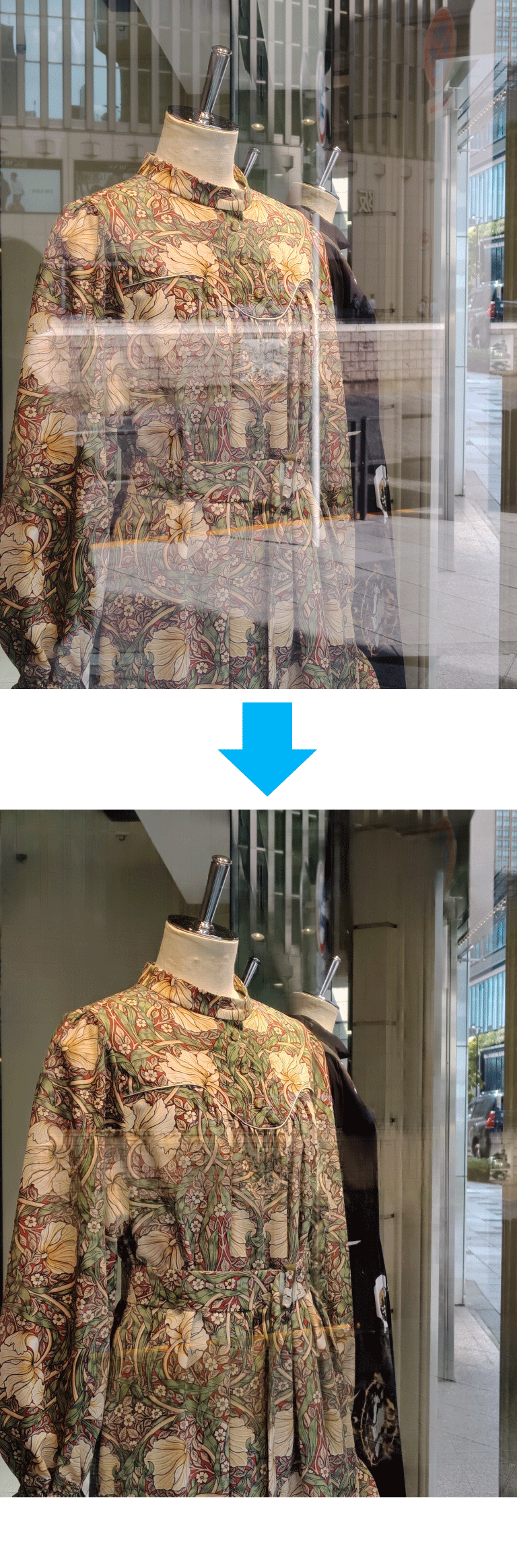
*Supported on AQUOS R10 and AQUOS R9 Pro
Quick Access to Android 16 Payments
Double-press the power button to instantly open Google Wallet for contactless payments. It's also possible to use Pay Trigger as an alternative. Event tickets stored in Google Wallet can be quickly displayed on-site.

The game menu has evolved to avoid distractions. An AQUOS exclusive.
The game menu now minimizes distractions by allowing you to move or hide it during gameplay. Features like "How to use," "Edge protection," and "Touch protection" are easier to use.

*Note: AQUOS R10 AQUOS wish5, and AQUOS wish5s already support this feature.
Peace of Mind for You and Your Smartphone
Safety Alert for Emergency Situations - AQUOS Exclusive
The Safety Alert feature emits a loud alarm to warn of danger. Parents can receive notifications via phone call or SMS if their child is in an emergency. You can register up to three emergency contacts for automatic calls and SMS with location information.

*Note: AQUOS wish5 and AQUOS wish5s already support this feature.
Warning
OS updates should be performed at your own risk. Please be sure to carefully review the following warnings.
- Once you perform an OS update, you cannot revert to the previous version. Please carefully read the warnings and change details before proceeding.
- Before performing an OS update, we recommend backing up the data stored on your device. For details on backing up data, please refer to the user manual.
- Some apps may not function properly if the Android™ version changes. Although your installed apps will not be deleted during an OS update, we cannot guarantee their performance.
- Depending on the home app you use, the icon layout may change after the OS update.
- After you start the OS update, please check the progress periodically until it is complete.